ContractorCost Pro™ — Professional Project Estimating Software. © 2025 Victor Studio. All Rights Reserved

Features

Everything from the first call to closeout

Laid out in the order you work a job. Every module shares the same customers, prices and people, so nothing is entered twice.

Getting started

Ready to estimate in one sitting

A built-in guide walks every step, and setup steps tick themselves off as you go.

  • Overhead from your own books. Import your Profit & Loss and get a real overhead rate.
  • Labor burden. Payroll taxes, workers' comp, insurance and benefits added to labor or recovered through overhead.
  • Work calendar and templates. Workdays, holidays, phase order, hold points and approval limits.
  • Import your lists. Customers, vendors, employees and items from a spreadsheet or QuickBooks, reviewed before anything is written.
  • Help Mode. The next step is outlined on screen with a tip.
  • Your branding. Logo, license number and contact details on every document.

Customers and sales pipeline

Every bid stays visible until it's won or lost

One window per customer holds notes, files, estimates, projects, signed documents and tasks.

  • Leads and customers with job-site and billing addresses, tags and a sales rep.
  • Automatic activity notes when an estimate is created, won or signed.
  • Message templates for site visits, follow-ups, welcome notes and review requests.
  • Sales Pipeline with chance %, weighted amounts and 30/60/120-day forecasts.
  • Your own pipeline stages, renamed and reordered.
  • Export to CSV or Excel, subtotaled by rep.

Your pricing data

Your costs and crew speeds, entered once

  • Materials library organized by 19 trades, with SKU, unit and cost.
  • Other costs: permits, dumpsters, rentals and subcontract allowances.
  • Labor categories priced from your crew members' real pay.
  • Production rates: how fast your crews work, so takeoffs suggest labor hours.
  • Market benchmarks for your region beside the estimate as a sanity check.
  • Revenue routing: which QuickBooks income account each line posts to.

Takeoff

Drawings become priced lines

Measure on the plan, type dimensions into a calculator, or let AI read the drawings. Then send everything to the estimate in one click.
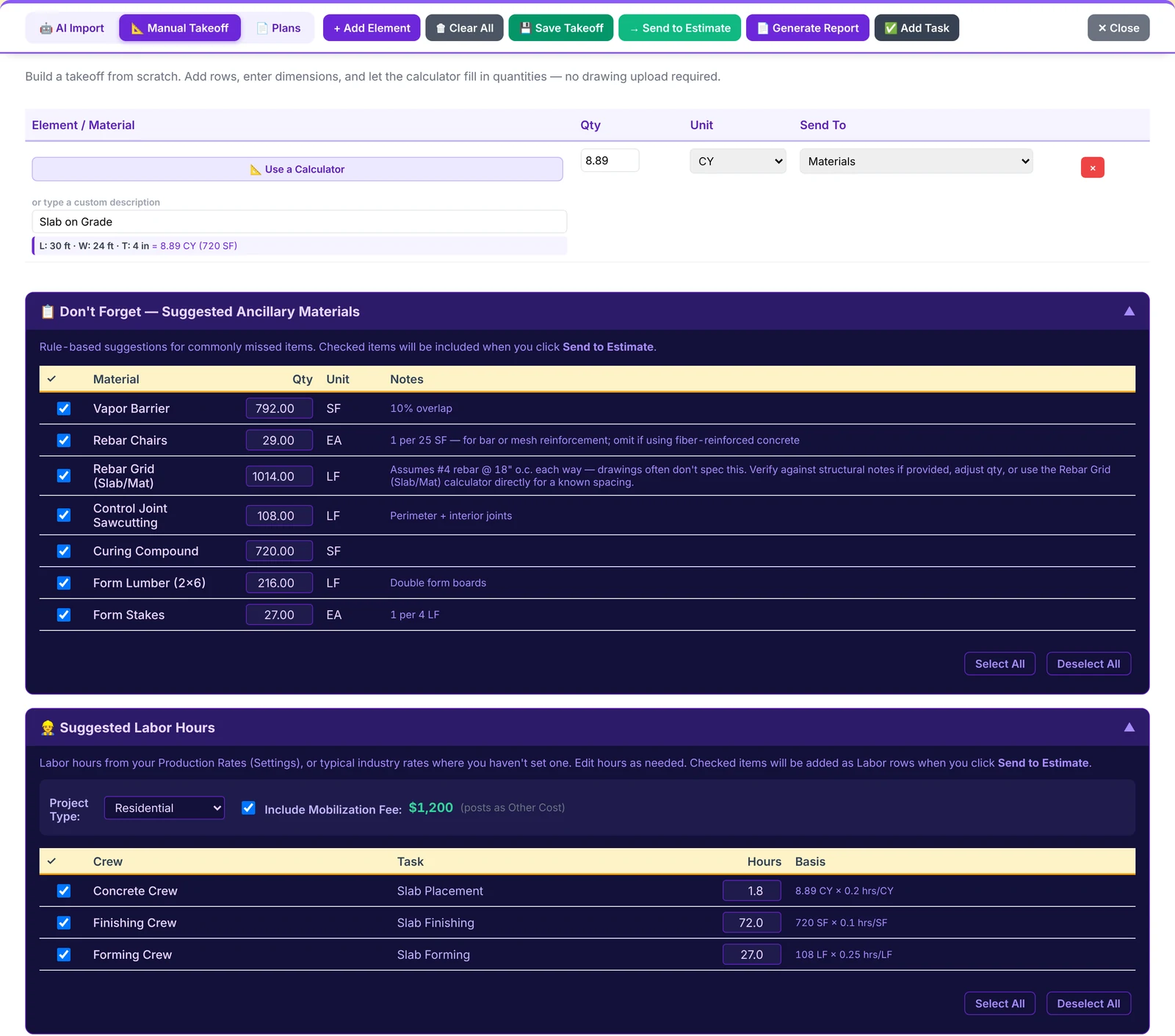
A slab calculator with suggested extras and labor
  • Measure on PDF plans. Set the scale, then click lengths, areas, rectangles and counts. The PDF stays on your computer.
  • 44 trade calculators: concrete, framing, post-frame, masonry, drywall, paint, flooring, roofing, siding, insulation, plumbing, electrical and HVAC.
  • Suggested extras for each element; tick the ones you want.
  • Labor hours from your production rates, with crew and task filled in.
  • AI Import: drop in plan PDFs, pick the trades, and review every element the AI finds.
  • Grouped by element on the estimate, so the customer reads "Slab on Grade", not 14 parts.

Estimates

Show the customer what you choose, without touching your costs

Direct cost, overhead, profit and tax update as you type. The client copy shows exactly the detail you decide.
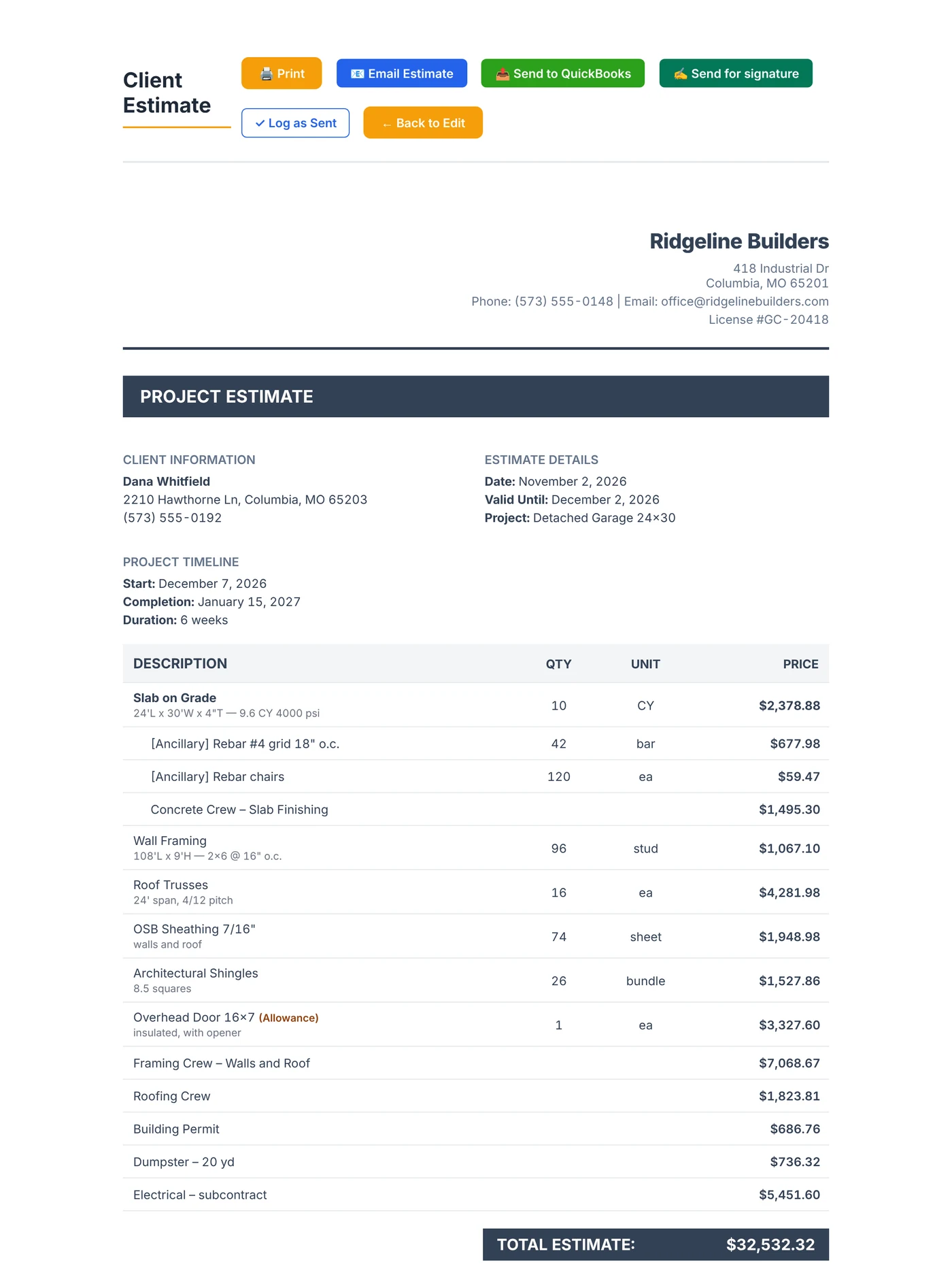
The branded client estimate
  • Fixed selling prices on any line; costs never move them.
  • Headers and hidden lines: one price per element, or collapse a group to a single line.
  • 🎯 Set the total and it spreads across lines to the cent, with margin and break-even warnings.
  • Allowances for items the customer picks later, with the difference settled by change order.
  • Four display formats plus payment schedules and your terms and conditions.
  • Internal worksheet with the confidential cost and margin breakdown.
  • Reality Check: compare with what you'd have bid by gut feel.
  • Service Agreement version of the same estimate, ready to sign.

E-signature, included

Signed online, with a record that can't be changed

Your customer gets a private link, reads the exact document, and approves or declines from any phone. No account needed.
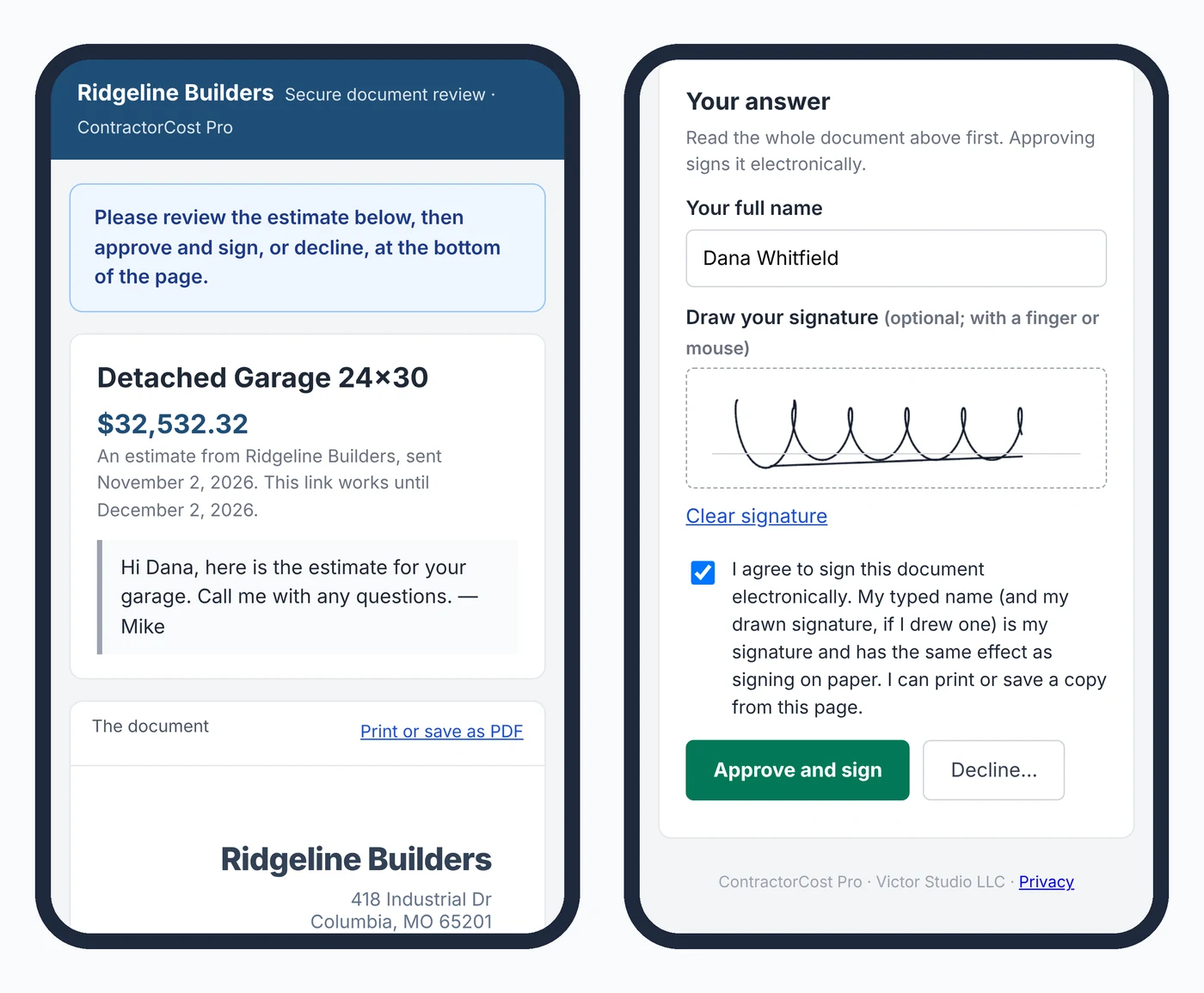
The customer's signing page on a phone
  • Estimates and service agreements: signing marks the estimate Won and the lead a customer.
  • Change orders: approval adds the new tasks and workdays automatically.
  • Selections: customers choose options with a running allowance total.
  • Lien waivers: subs sign online; Missouri's statutory form where the law requires it.
  • Punch list sign-off from the customer at the end of the job.
  • Signature record: names, times, drawn signature, IP address and document fingerprint.

Projects

Scheduled, staffed and budgeted from the estimate

The project wizard sorts estimate lines into trades and phases and builds the tasks, budgets and links for you.
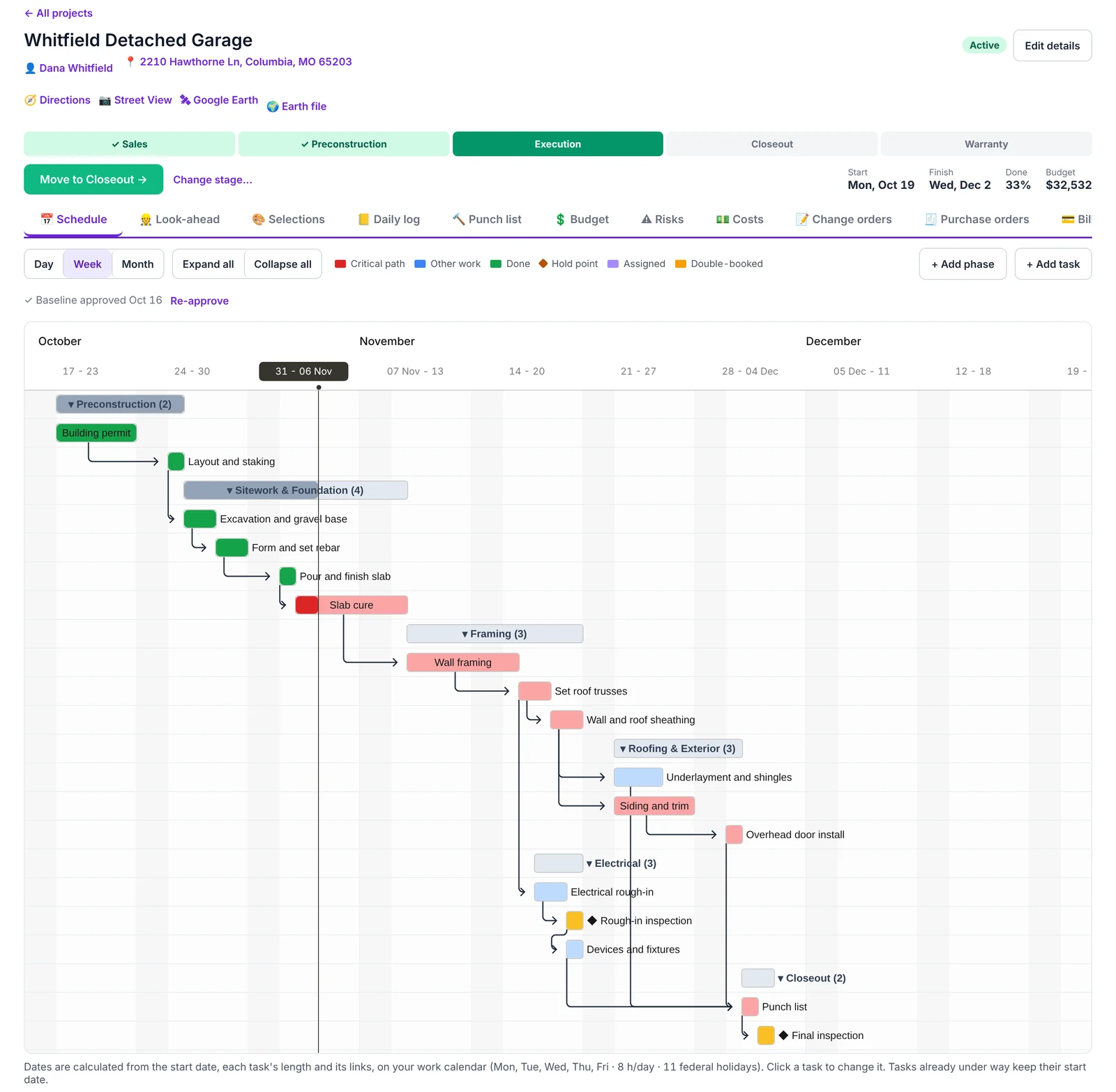
The project schedule with the critical path
  • Critical path schedule on your work calendar, with float and a baseline to compare.
  • Job stages with gates: Sales, Preconstruction, Execution, Closeout and Warranty, each with its checklist.
  • Look-ahead of the next few weeks and who's on it.
  • Master Gantt and Jobs Map: every job, person and machine on one timeline and one map.
  • Resources: people, crews, equipment and subs, with double-booking warnings.
  • Risk register with a heat map and "start a change order" when a risk happens.

Purchasing, changes and billing

Every dollar in and out, tracked against the job

  • Purchase orders started from the estimate's lines, so nothing is ordered twice. Approval limits and delivery receiving.
  • Change orders priced with your markup, approved over your dollar limit, signed online.
  • Pay applications on a schedule of values (G702/G703 style) with retainage, or deposit and milestones.
  • Job costs: budget against committed against actual against projected, by phase and task.
  • Subcontractor insurance: certificates checked against your minimums, warnings before they lapse.
  • Lien waivers from subs and to your customer, conditional or unconditional, partial or final.

In the field

Works on the phone in a foreman's pocket

Nothing to install. The time clock keeps working with no signal and uploads when it's back.

  • Time clock by job and task, with breaks, job switching and optional location.
  • Crew clock-in from one phone.
  • Timesheets with overtime, corrections history and approval.
  • Payroll files for ADP RUN, ADP Workforce Now, Paychex Flex and Gusto.
  • Daily log with automatic weather, crew, deliveries, delays and photos.
  • Punch list with before and after photos, sent back with a note when not accepted.

Closeout

Know if you made money, and why

The closeout report compares what you sold, what you planned and what happened, so the next estimate is better.

  • Contract with change orders and the final billed amount.
  • Cost by phase and task, with the biggest overruns and savings.
  • Labor hours and overtime against the estimate.
  • Schedule against baseline and lessons learned.

Security and reliability

The things you can't see, already in place

  • Roles and permissions for every area, enforced by the database itself.
  • Two-step sign-in by emailed code or authenticator app.
  • Nightly encrypted backups, plus weekly backups of your files.
  • Data stored in the United States.
  • Monitored around the clock, with alerts when anything breaks.
  • No advertising, no tracking cookies, and your data is never sold.

See it with your own numbers

Set up your company and price a real job.

Try it free